Point your camera.
Watch the sign become words.
SigLa reads Filipino Sign Language through your phone's camera and turns it into text and speech, live, so signers and non-signers can understand each other.
Signs in the Word Bank, each with a demo video
Hand and pose detection run on your phone
No account or sign-up. Open the app and sign.
Read the translation in English or Filipino
The exact screens you'll use, from your first minute
Emergency SOS
Hold the SOS button on the translator for two seconds when a conversation needs to become a call for help.
Learn at your pace
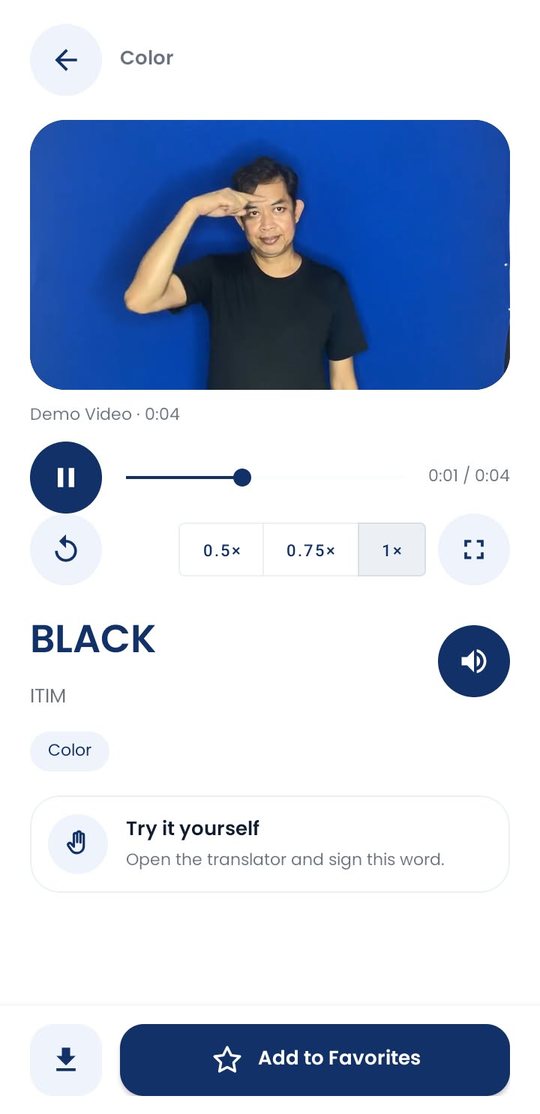
Every word has a demo video you can slow down, replay and hear pronounced.
Practice offline
Save Word Bank videos ahead of time for classrooms and clinics with no signal.
On your phone in under a minute
SigLa isn't on the Play Store yet. It installs straight from the APK file.
Download the APK
Tap Download on your Android phone, or open this page in the phone's browser.
Allow this source
Tap Settings in Android's prompt, turn on Allow from this source, then go back.
Install and open
SigLa only asks for the camera. No sign-in, nothing else to set up.
Try SigLa on your own phone
Free, no account, and the Word Bank works offline.
Download for Androidv1.13.0 · Android 7.0 (API 24) or newer · ~204 MB